

Users of email have long thought of executable and .dll attachments as the main focus when cyberattacks arise, but there may be another type of highly used malicious file to be aware of. According to a recent study, HTML attachments are being employed by adversaries the most when it comes...
How to Test Your Browser’s Security

As your personal gateway to the internet, your web browser is the first line of defense against malicious websites. If your internet browser is not secure, viruses and spyware can infect your computer and damage your important data. And while a good antivirus does help, it’s always better to prevent...
How an 8-Character Password Could Be Cracked in Less Than an Hour
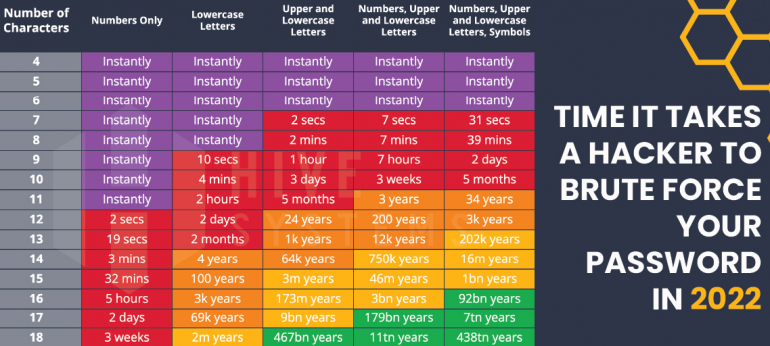
Security experts keep advising us to create strong and complex passwords to protect our online accounts and data from savvy cybercriminals. And “complex” typically means using lowercase and uppercase characters, numbers and even special symbols. But complexity by itself can still open your password to cracking if it doesn’t contain...
How to Stop Google Chrome From Blocking Downloads

Google Chrome automatically blocks downloads of suspicious files. However, if you think your file is completely safe, you can download it by temporarily allowing all downloads. Here’s how to do that on desktop, Android, iPhone, and iPad. Warning: Know that Chrome blocks downloads of certain files because it believes those...
Zero-Day Exploit Found Affecting Chrome and Edge Browsers

If you use Google Chrome or Microsoft Edge on your computer, stop what you're doing and update your browser. As reported by security blog Sophos Security, Google announced that a zero-day exploit has been found in Google Chrome that could allow hackers to perform malicious activities on your computer. Today,...