
Losing files is gut-wrenching, especially if it’s an important work document or pictures of your kids. Online storage solutions usually offer a way to restore deleted files, and iCloud is no different. The process is convoluted, but we’ll hold your hand all the way. Companies like Dropbox offer some extensive...
Protect Your Business With This New Year’s Resolution | Start a Security To-Do List

Protecting an organization depends on deep knowledge and experience, but a security to-do list can go a long way toward locking things down. The old saying that security is only as strong as your weakest link could not be more true today. Bad actors are targeting every element of the...
Two Ways to Quickly Copy Graphic Files in Word or PowerPoint
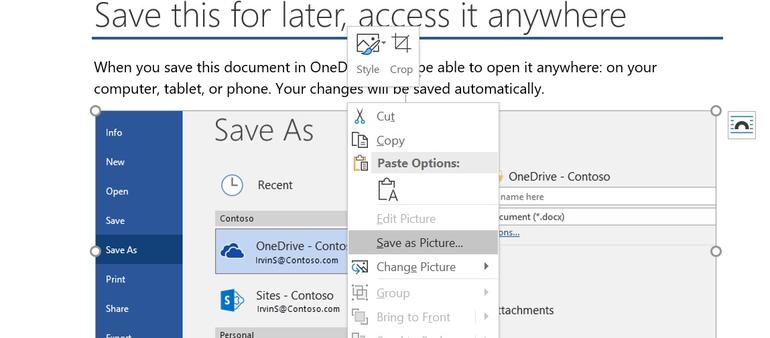
Finding a Word document or PowerPoint presentation with graphics that you can reuse is a bit like finding buried treasure. Saving them presents a bit of a conundrum, too. You can save each graphic manually, one at a time, but that's tedious and time consuming. In this article, I'll show...
How to Create, Edit and Apply Signatures in Microsoft Outlook
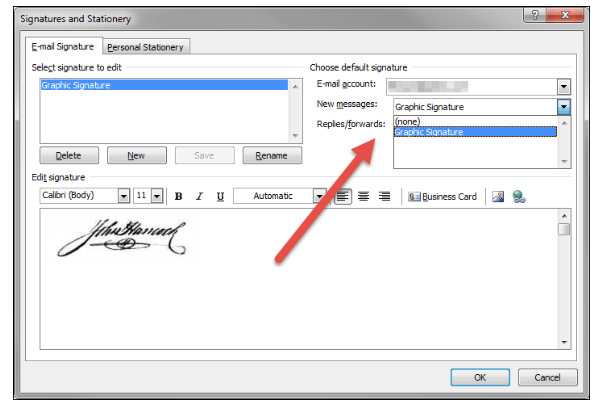
Outlook lets you apply a default signature to new messages, replies, and forwards—you can even have different default signatures for new messages and replies/forwards. You can also create additional signatures that you can apply to any message on the fly. Here’s how they work. A mail signature is a useful...
FBI and Department of Homeland Security Issue Critical Ransomware Alert

On Monday the FBI and Department of Homeland Security (DHS) issued an alert for SamSam ransomware also known as MSIL/Samas.A. Hackers armed with SamSam targeted multiple industries, including some within critical infrastructure predominantly withing the United States. How SamSam Ransomware Attacks Happen The actors exploit Windows servers to gain persistent...